
Carmageddon Android Port, AI yes, slop no
Here is the thing. Carmageddon is my favorite game of all time. Not 2, not TDR 2000, not Max Damage or the recent Rogue Shift. The original one from 1997. For me, it was an instant classic from the first minute I played it on my 486 DX4. I just love it.
Sixteen years after I first got my hands on it, an Android version was released by Stainless Games. I was so excited I wrote a review here on AndroGaming.com. Unfortunately, that version hasn’t aged as well as the game itself. Getting it running on newer Android devices is a problem, and proper controller support is another story.
So, here we are. Instead of chasing old workarounds or playing the PSX/N64 versions, I decided to work on an Android port that sticks to the original PC release as much as possible, with a few minor improvements.
I do have a background in C, but that doesn’t magically give me unlimited time. With extensive AI assistance and some very important groundwork from other developers, I got this version together in about a week. Without those things, this could easily have swallowed years of my life. And here it is.
Standing on other people’s work
This project builds on Dethrace, an open-source reimplementation of the original Carmageddon engine, and the existing Android port by mgrz18. Dethrace’s contributors did the substantial work of rebuilding the engine, while mgrz18 provided the Android foundation, including SDL and OpenGL ES integration. They deserve the credit for making this possible in the first place.
My goal was to build on that foundation and make the game comfortable to install and play on modern ARM64 Android devices. This runs natively, using your original PC game files. There is no DOS or Windows emulator hiding underneath.
The process was a fairly familiar loop: build, install, play, find something broken, repeat. Rendering issues, controls and performance needed attention, then came the launcher, graphics options, remapping and easier game-data importing. ChatGPT/Codex assisted with code, debugging, tests and packaging. I directed the changes and tested the builds on actual hardware. Sometimes that meant checking a fix. Sometimes it meant playing Carmageddon longer than strictly necessary (yay for testing).
The result is now version 0.9, with the APK and source available on GitHub. It is an unofficial community project, and the original game is still the work of Stainless Games. The repository includes the full credits and dependency licenses.
Installation
This is actually pretty easy. You need a compatible Android device, the APK linked below and your own PC copy of Carmageddon. Splat Pack import and game selection are supported too, using the expansion’s own files.
The current APK is ARM64 only and requires Android 7.0 or newer, a 64-bit Android installation and OpenGL ES 3.0. Those are the technical requirements, not a promise that every old phone will run it beautifully.
I used my own GOG copy. Find the game’s installed DATA and MUSIC folders and put them in a ZIP. DATA should sit directly at the root of the ZIP, rather than inside another CARMA folder. MUSIC is optional, although personally I would bring it along.
One GOG-specific detail: some Max Pack installations keep additional files under __support/app/CARMA/DATA. Merge those into a copy of CARMA/DATA before zipping, otherwise you may end up missing files such as the key maps. The installation instructions cover that layout.
Send the ZIP to your device, install the APK and open the launcher. Choose Carmageddon, select Import game data ZIP and let it finish. Once it says Ready to race, you are good to go.
For Splat Pack, prepare a separate ZIP from the complete expansion data and choose Splat Pack in the launcher before importing. Don’t mix the two games’ DATA folders together. Their installations and saves stay separate.
What to expect
As I mentioned above, the goal is the original PC experience, without extensive changes to its assets. I deliberately kept post-processing modest, but I do think the original view distance is a bit restrictive by today’s standards. So there is an option to double it.
Then there is higher-resolution rendering and widescreen support. Nothing crazy like 21:9, just a cozy 16:9 and, of course, the original 4:3. Retroid Pocket Nova users should appreciate that. The original textures remain, with optional bilinear smoothing if you prefer them slightly less crunchy. You can turn it off in the launcher.
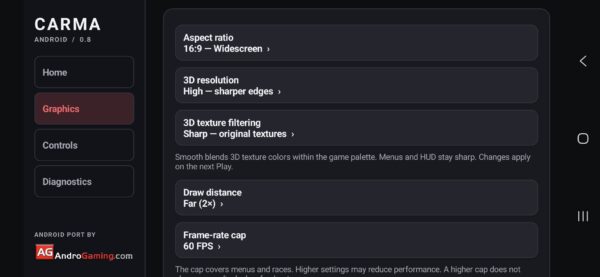
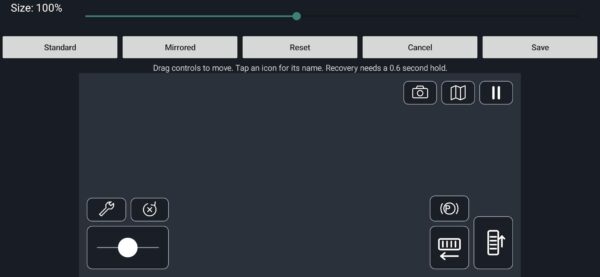
There are a couple of neat things included, such as frame-rate caps of 60, 120 and 144 FPS, plus an uncapped option. Touch controls support both analog and digital steering, with a layout you can rearrange and resize. Android compatible gamepads and handheld controls get remapping options too.
Then there is the diagnostics section. Since we are still at 0.9, I wanted a practical way for users to report crashes, graphical glitches and performance problems. Error logging and performance recording are optional, and you can export the logs to include with a bug report. Nothing gets uploaded automatically.
I tested the game on what I have at the moment: my everyday phone, a Samsung Galaxy S24 FE, and my trusty Retroid Pocket Flip 2. Both could reach 60 FPS at the highest settings in my testing, although this doesn’t mean locked 60 in every situation, drops are possible.
If your device struggles, reduce the view distance to Original and try the Performance rendering setting. That lowers the rendering resolution. I suspect there is room for much older hardware here, but I haven’t tested enough devices to draw that line yet.
As far as gameplay goes, I played through and finished all the stages, bought cars and most of the upgrades, and tested the power-ups. No problems in that latest playthrough, at least on the hardware I have at hand. That goes further than the older testing notes currently on GitHub.
There is still an earlier intermittent mid-race exit documented in the project, so I am keeping this at 0.9 while stability testing continues. My latest sessions went well, but two devices don’t represent the entire Android universe.
What’s next?
I plan on maintaining and improving this port until I am happy with it. The next major thing I want to tackle is local LAN/Wi-Fi multiplayer, followed by online multiplayer if that goes well. Neither is available in the current version. Then, I would like to try bringing this on Playstation Vita and OnionOS (Miyoo Mini Plus). Man, playing PC carma on that little thing would be something else (but I AM skeptical about the performance). We’ll see.
I would also like to hear whether you want more image processing options or prefer keeping things close to the original. Personally, I lean toward the latter, but having a choice doesn’t hurt.
If you try it, let me know how it runs. Your device, Android version and graphics settings will help much more than “it doesn’t work,” although I understand the temptation.
For now, I am happy I can play this again and not depend on some company that will lose interest as soon as the profit drops.
Links
- Carmageddon Android Port: APK releases
- Source code and installation instructions
- Bug reports
- Dethrace
- mgrz18’s Android port
Dejan Balalovski