
Super Mario Strikers on Android: Hands-on and Installation
A couple of days ago, I stumbled upon a community port of Super Mario Strikers for Android on GitHub. This game has provided hours of guilty pleasure whenever my friends come over, so I decided to give it a quick test and explain the installation process along the way.
First things first: you need an ARM64 Android device running Android 9 or newer, Vulkan support and your own game files.
And here is something that wasn’t immediately clear to me. The project calls itself an Android port of Super Mario Strikers, but the main README doesn’t explicitly say which console’s game files you need. Judging by the screenshots, I figured it was the GameCube version. Bingo.
To save you that little guessing game: you need the original Super Mario Strikers for Nintendo GameCube.
Getting started
The Android documentation lists support for .iso, .gcm, .ciso and .gcz disc images. A .7z archive isn’t one of those, so extract it first.
Installation itself is pretty straightforward. Download the APK linked below, install it and open the launcher.
For the setup I used, grant All files access, then put your game image in:
/storage/emulated/0/Strikers
That’s a folder named Strikers at the root of your phone’s internal storage. Once the launcher detects the game, the blue button changes to PLAY and you can start.
The permission request and file placement could be explained better. The documentation describes a private-folder fallback and additional search locations, but a normal file picker would make the whole thing easier. Let me point at my ISO and get on with it.
Optionally, explore the settings a bit before starting. You can adjust the FPS limit, raise the internal resolution and load a custom graphics driver, such as Turnip on compatible Adreno devices.
I tested this on my Samsung Galaxy S24 FE, so I couldn’t try the Adreno driver option. If you want the background to fill your phone’s wider display, also have a look at Wide Background and its Stretch/Ultrawide options. Personally, I’d rather spend a minute checking those than stare at black bars .
Bring a controller, if you can
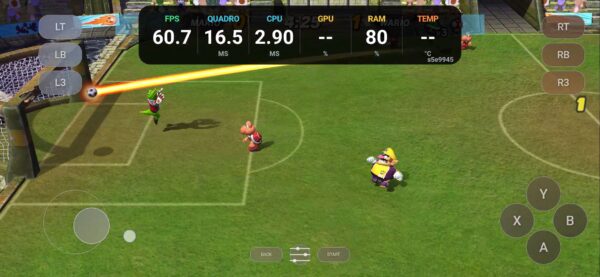
The on-screen controls are usable, but they are easily the weakest part of the gameplay. Granted, this game was never designed around a touchscreen. You can get away with it for a while, but I would connect a proper Android compatible controller if possible.
One odd detail is the Select button. The GameCube never had a dedicated Select button, although the project’s Xbox-style touch layout explains why it appears here.
More importantly, I couldn’t get the on-screen Start button to register. That meant I couldn’t pause or access the in-game menu to quit the match or change anything there. Running the game is one thing. Being allowed to stop playing would be nice too.
I also didn’t get any haptic feedback from the touch controls, so it was easy for my thumb to drift off-target without noticing. Some feedback and a working Start button would go a long way here.
How it ran on my S24 FE
The game ran at full speed on my device, and I didn’t notice any graphical glitches during this session. That was encouraging on the S24 FE’s Exynos chipset and Xclipse 940 GPU, using the system driver rather than any Adreno-specific workaround.
Menus were quick, and saving and loading through the virtual memory card worked. Everything was pretty peachy, apart from my arguments with the touch controls.
Music and sound effects sounded right, and the graphics held up well. If your device has the headroom, increasing the internal resolution cleans things up nicely.
This was a quick hands-on, , bu the port itself made a good first impression.
A proper native port, with some rough edges
There is substantial community work behind this. Luis Santos, aka luisxl15, brought the project to Android, building on the native PC port by new-coke, which in turn builds on Yannick Suter and contributors’ decompilation work.
The game code is compiled for ARM64, with rendering through Vulkan using the shared Aurora based foundation. It uses the original disc image for game data and it isn’t running that disc through Dolphin.
Of course, playing GameCube games on Android through Dolphin is already an option. This project gives you a dedicated native version of this particular game. Whether it is faster would need a proper comparison, and I haven’t done one.
All in all, a solid first impression, but unfinished around the edges. Clearer installation instructions, an explicit mention of the GameCube version and some attention to the touch controls would make it much easier to recommend.
Links
- Download the Android APK
- Project and source code
- Android requirements and installation notes
- Original native PC port
Dejan Balalovski