
Need for Speed Most Wanted 2005 Android Port Hands-on with v0.1.8
Most Wanted Android Evolved lets you play the PC version of Need for Speed: Most Wanted (2005) to Android through static recompilation. I tested version 0.1.8, playing Quick Race and the beginning of Career mode on my Samsung Galaxy S24 FE.
The first impression? Pretty good. The game runs, the music works and the controls give you quite a bit of room to arrange things your way. There are still rough edges, but this is already something useful, and haptic feedback works as it should.
Which Most Wanted do you need?
You need your own installed copy of Need for Speed: Most Wanted from 2005 for PC. My Black Edition copy worked in the sessions I tested. This project isn’t based on the Xbox 360 version, and it has nothing to do with the later game sharing the Most Wanted name.
The APK doesn’t include the game files.
The project uses pcrecomp to translate the original PC executable’s x86 code into C ahead of time, then compiles that for Android. It also supplies the compatibility code needed for the original Windows interfaces, with Direct3D 9 graphics translated to Vulkan.
Installation and the DLL you shouldn’t forget
The requirements are Android 10 or newer and Vulkan 1.1 or newer. The v0.1.8 release provides ARM64 and ARMv7 APKs. ARM64 is the recommended choice for supported devices and the developer notes that the ARMv7 build hasn’t yet been tested on a device.
Install the APK, then copy your PC game installation into:
/storage/emulated/0/nfsmw
In a file manager, that means a folder called nfsmw directly inside internal storage. Speed.exe should sit inside it alongside the game’s folders, including GLOBAL, TRACKS, CARS, FRONTEND, LANGUAGES, SOUND, MOVIES and NIS. Don’t accidentally bury everything one extra folder deep.
One detail worth putting in bold: you also need the 32-bit version of d3dx9_26.dll in that same folder, next to Speed.exe. You can donwnload it at the bottom of this article.
Yes, the 32-bit DLL, even when using the ARM64 APK. The game originated as a 32-bit PC application. This was an easy detail to miss during setup, although the project’s README does mention it. It points to the Windows SysWOW64 folder as a source if the required DirectX component is installed.
Open the launcher, grant file access, adjust your settings and press PLAY.
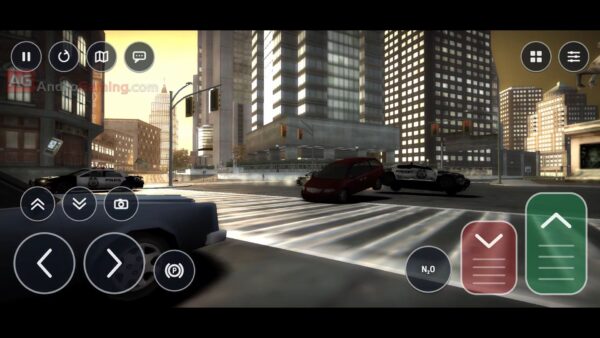
How it runs on my S24 FE
Performance was quite good in Quick Race and the opening of Career mode. I would still like to see further optimization, particularly for devices outside the Snapdragon/Adreno combination, but this was an encouraging start on my Samsung’s Xclipse 940 GPU. I haven’t worked through the whole Career mode or tested every race and pursuit situation, so drops can still happen, but rarely.
The launcher supports custom Vulkan drivers, including Turnip for compatible Adreno GPUs. Since I was testing on Xclipse 940, I used the system driver and couldn’t compare this.
Internal resolution and the frame-rate limit can be adjusted in the launcher, so there is room to find a balance that suits your device. Personally, I would get the racing feeling right before spending too long making the scenery prettier.
Sound effects and music worked correctly in my testing. Engine noise, racing and the soundtrack all doing their thing without becoming another troubleshooting project. I’ll take it.
Good controls, with a slightly unusual feel
The touch controls are good overall, although they felt a little strange at first. The useful part is that the on-screen buttons can be moved and resized, so you can adjust the layout instead of teaching your thumbs to tolerate someone else’s arrangement.
I didn’t find an analog steering option for the touch layout during my test. Steering with buttons does the job, but I would appreciate a more gradual touch-steering option.
That doesn’t mean the project has no analog input at all. The documentation lists tilt steering and Bluetooth/USB controller support, with an optional analog DirectInput mode for gamepads. My comments here are about the on-screen controls I used.
What v0.1.8 changes
Released on October 23, version 0.1.8 focuses on camera framing and audio.
The camera fix addresses the overly zoomed-in view on wide phone screens. It applies a field-of-view adjustment based on ThirteenAG’s WidescreenFix, preserving the vertical view while expanding the horizontal view.
Audio buffering was also adjusted to reduce interruptions on MediaTek, Mali and Unisoc devices. Another fix stops the last piece of engine sound or music from looping when the game stops supplying audio during loading.
The release notes still acknowledge unresolved crash reports on several devices and a rear-view mirror orientation issue.
Does multiplayer work?
According to the developer, LAN and online multiplayer have already reached gameplay on two Android phones. This is an existing feature, right here and now.
The tests used a Galaxy S25 Ultra and a Redmi Note 8 with ARM64 builds. Online play uses an EA Nation replacement server. In the reported online test, the Redmi hosted while the S25 used a VPN, and it worked.
For LAN hosting, you also need server.dll and server.cfg from your PC installation in the phone’s nfsmw folder. The launcher includes an online-server setting.
Worth trying?
For an early hands-on, this left a good impression. Quick Race and the opening of Career worked, performance was quite good on my S24 FE and the sound behaved properly. The adjustable controls help, even if touch steering is the part I would most like to see refined.
It is still an early release, and I wouldn’t confuse a successful evening of racing with a fully tested Career playthrough. But if you already own the PC game and have a compatible phone, there is enough here to make the setup worthwhile.
Just remember the DLL.
Links
- Most Wanted Android Evolved v0.1.8 APKs and release notes
- Source code and installation instructions
- Bug reports
- pcrecomps
- d3dx9_26.dll, 32-bit
Dejan Balalovski