
Monster Hunter 4 Ultimate on Android Hands-On and Installation
Monster Hunter 4 Ultimate on a phone sounds like a good way to lose track of an afternoon. Getting it running takes a little more preparation than installing an APK, but after testing khorne-hub’s Android port on my Samsung Galaxy S24 FE, I think the effort pays off.
Performance was excellent overall. I noticed mild slowdowns on a few occasions, but the port otherwise works as expected, and saving worked. The on-screen controls are excellent too, although there is only so much a touchscreen can do against actual buttons.
I also used the single-screen mod linked in the project’s instructions.
A little background
Monster Hunter 4 Ultimate is Capcom’s expanded version of Monster Hunter 4, released internationally for the Nintendo 3DS in 2015. You prepare equipment, take quests and hunt monsters that have very strong objections to becoming your next set of armour.
As with all MH games, 4U will ease you into the controls and how to stay alive when facing the giants. Knowing how to swing your weapon and knowing when to swing it are two very different things. I wouldn’t get too caught up in comparisons with Dark Souls, but Monster Hunter certainly expects you to learn your weapon, read the monster’s movements and make those brief openings count. Getting greedy with one extra hit is usually where the lesson starts.
This Android project recompiles the game’s code ahead of time into native code. It uses its own runtime to handle the console’s functions and Vulkan for graphics. You don’t launch it through a separate 3DS emulator.
Credit goes to khorne-hub for this Android project, CompaLarios18 and the MH4UltimateDC contributors for the recompiler and runtime, and Azahar and Citra for work used by that runtime.
What you need
An ARM64 device running Android 9 or newer with Vulkan support, and around 5 GB of free space.
You also need your own decrypted USA copy of Monster Hunter 4 Ultimate as a .3ds or .cci file, plus its 1.3.0 update as a .cia.
Then comes the less convenient part. Preparing the game requires a Windows, Linux or macOS computer with Python 3.10 or newer and roughly 3 GB free. I’m covering the Windows procedure here.
You download the project’s source archive to run its preparation tools. You do not need to build the Android APK yourself.
Put the game and update together
Create a working folder on your PC, for example:
C:\MH4UPut the decrypted base game and update inside it. Keep both files together. Their naming isn’t important.
Download the source through the green Code button on the project page, then select Download ZIP and extract it.
Install Python if needed. With the Windows installer, enable the option to add Python to PATH so the build script can find it.
I also used jM5557’s single-screen mod, which relocates several menus and interface elements from the bottom screen to the top screen.
Download its ZIP through Code → Download ZIP. Inside C:\MH4U, create a folder named mods and extract the mod there.
You should end up with these two directories:
C:\MH4U\mods\mh4u-single-screen-mod-main\0004000000126300
C:\MH4U\mods\mh4u-single-screen-mod-main\0004000E00126300
You have to do all this BEFORE running the builder.
The mod is still a work in progress. Its own documentation lists some interface overlap issues, but overall the game works better on single screen devices.
Next, find the .bat file
Here is the full path when extracting the main branch ZIP:
4u-native-main\mh4n\tools\android\Build MH4U library for Android.batDouble-click the BAT file and select your update’s .cia when prompted. The script finds the base game beside it.
When asked about mods that change the game’s code, choose Yes and select your C:\MH4U\mods folder.
On its first run, the Windows script downloads its compiler, approximately 180 MB. Let it finish. The dev estimates a few minutes for the build, although that will depend on your PC.
When it reports Done, check for both generated files in your game folder:
libmh4u_code_native.so
libmh4u_code_native.id
Keep both. They are generated from your own game and are required by the Android app.
Time to move the files
Copy the complete MH4U folder to your phone, including the game, update, generated library files and mods. A folder in internal storage is fine. The project says not to place it inside Android/data.
Download and install the APK from the official releases.
Launch MH4U, tap Give permission and choose folder, grant the requested file access and select your MH4U folder. Confirm with Use this folder.
The app checks the contents and reports missing files if something is wrong. With the single-screen mod included in the build, the secondary screen starts hidden. A touchscreen button can bring it back when needed.
If a future app update says your code library is incompatible, rerun the preparation script from that version’s source and copy over both newly generated library files. Changes to code-modifying mods also require rebuilding.
How it ran on my S24 FE
I tested on the Samsung Galaxy S24 FE, with its Xclipse 940 GPU. Performance was excellent overall, with mild slowdowns on a few occasions.
I’m not attaching an exact frame-rate claim to that. What I can say is that the experience was very good during my testing, the port behaved as expected and saves worked.
The on-screen controls deserve credit. They feel properly considered for a phone, although I still wouldn’t put them on the same level as physical buttons. For a game like Monster Hunter, that difference is huge as every millisecond counts.
You can rearrange everything. Which is considerable since you need to adapt to different situations and weapon types. A long press on the settings gear opens the layout editor, where you can go nuts, change positions, sizes etc.
Physical controllers are supported as well, but my comments here concern the on-screen controls I tested.
A few useful settings
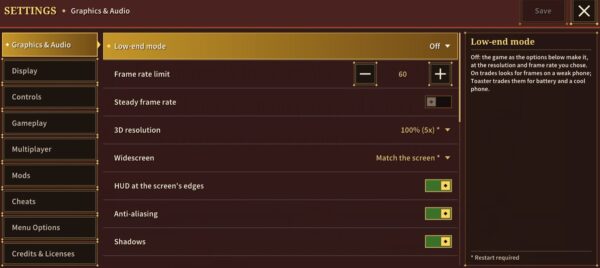
The settings gear gives access to resolution, frame-rate limits, effects and controls. There are also Low-end and Toaster modes for less powerful devices or lower power consumption. Or if, you know, over heat your devices so the performance drops.
You can also import and exports saves through this menu, including saves from Azahar, Citra and Checkpoint backups. That is separate from my confirmation that ordinary saving worked during this test.
Multiplayer through network rooms is documented too, including rooms shared with Azahar users. But I didn’t personally test that.
Worth the preparation?
The main headache here is that you need a PC, Python, the full source download and a locally generated game library before the APK can do anything useful.
Once past that, the result I experienced was excellent overall. A few mild slowdowns didn’t change that impression, and the touch controls are much better than a pile of virtual buttons thrown over the picture.
Getting this much Monster Hunter onto a phone as a standalone app, complete with working saves and a single-screen layout, is well worth it in my opinion.
Links
Dejan Balalovski