

PES 5 on Android, finally a football port
Pro Evolution Soccer 5 is Konami’s football game from 2005, back when the FIFA versus PES argument could comfortably occupy half an evening before anyone picked up a controller. It belonged to the PlayStation 2 and original Xbox generation, with PC and PSP releases too. Long before eFootball, this was simply PES.
For anyone discovering it now, the attraction is fairly obvious. You get proper matches, deliberate passing and nice gameflow, even for today standards. The graphics are older, the squads are older and some of us playing it are considerably older. The football still works.
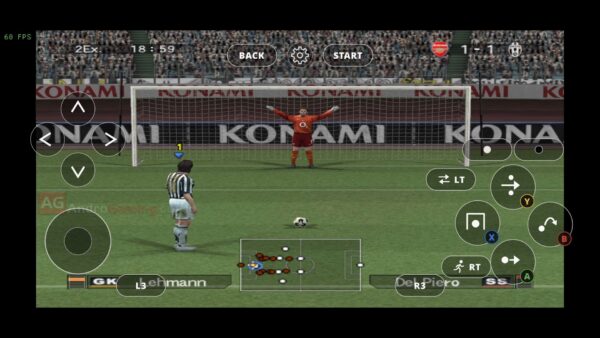
An unofficial Android port by datfooldive now brings the original Xbox version to Android, handhelds and phones too. I tried it on my Samsung Galaxy S24 FE with its Xclipse 940 GPU, and performance was close to excellent. I also recorded gameplay, so you can see how it runs.
How this port works
The project uses XboxXBE-Recomp, developed by TGP482, to statically recompile the game’s original x86 code into C++, which is then compiled for Android ARM64.
In practical terms, the game code runs as a compiled Android build, with a runtime providing the services it originally expected from the Xbox. Graphics go through Vulkan, while SDL3 handles windowing, input and audio. This isn’t an Xbox emulator.
The Android work builds on the Linux PES 5 port and reuses Android groundwork from the developer’s Black, Dynasty Warriors 5 and The Warriors projects (links at the bottom). The available v1.0 release is marked as a prerelease, and the project is still described as a work in progress.
What you need
This port requires Android 10 or newer, ARM64 and Vulkan 1.1 or newer.
You also need your own copy of PES 5 for the original Xbox, specifically the release identified in the documentation as title ID 0x4B4E0030. The PC, PS2 and PSP files won’t work, and no game assets are included with the APK.
Installation is simple:
- Install the APK and open PES5 Android.
- Grant the requested file access.
- Copy your game into
/storage/emulated/0/PES5, or aPES5folder at the top of your SD card/Internal storaeg.
The app starts the game once it finds the required files. Saves are stored in an hdd folder alongside the game data.
Aged like a fine wine
Nobody is going to mistake this for a current-generation football game (low poly and all that), but the game does look slick. The port also gives it some help. Its settings include rendering resolution, anti-aliasing and anisotropic filtering, along with aspect-ratio options. All manually adjustable. Even the match camera’s height and distance too, which is a useful addition for sure.
On my S24 FE, performance was close to excellent during the session I played. I didn’t encounter any obvious bugs, and sound effects and music worked correctly. Saving the option file also worked without problems.
This was a hands-on session, not a complete test of every mode or a full Master League campaign. Still, the parts I used behaved well enough that I could concentrate on playing.
Controls work, my fingers don’t
The on-screen controls are okay overall. You can reposition the controls through the settings panel. What I missed was haptic feedback. Without it, there is no physical confirmation that your finger is still where it needs to be.
When this was fresh from the oven, capacitive touchscreens weren’t even a thing yet, so don’t expect much. It’s particularly difficult to sprint while, realistically, you only have your thumb to do it. So yes, possible, but physical controller will always be superior.
Worth installing?
What stood out to me was how little time I spent thinking about the port itself once the match started. Performance was strong, the picture looked good, saving worked and the audio was there.
There is nostalgia here, obviously. PES 5 comes from a very particular period of football gaming, and seeing it running this well on a phone brings some of that back. But nostalgia only gets you through the first few minutes. After that, the game still has to be worth playing. And it is. Just use a controller.
Links
Dejan Balalovski