
Moonlight Vita 1.0 Released
Moonlight Vita has reached version 1.0.0, and this is more than a just a number celebration. The recent release updates the PC streaming client with a new interface, microphone forwarding, more video options and changes aimed to reducing streaming latency.
If your Vita has been collecting dust while your gaming PC does all the work, this might be a good excuse to reunite them. The PC still does the heavy lifting. The Vita gets the sofa.
Streaming to Vita
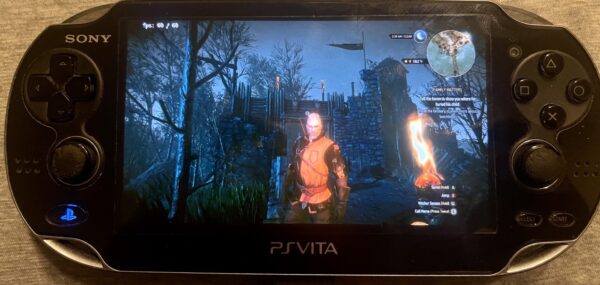
Moonlight Vita is a free, open-source streaming client for jailbroken PS Vita and PlayStation TV systems. The stream is going over your network from your gaming PC to the little handheld, similar to steam link. Well, that’s the plan.
You need a PC running Sunshine or another compatible GameStream host.
Version 1.0 main selling point is a modern interface built with Borealis, while keeping the Legacy interface available in the same VPK. A first-run welcome lets you choose between them, so existing users aren’t forced into the new layout.
The update also adds controls accessible during a stream, keyboard settings and configurable shortcuts in Borealis. Both interfaces default to START + L1 + R1 for the pause menu and START + LEFT for the keyboard, although Legacy keeps these combinations fixed.
More control over the stream
Hardware H.264 decoding now supports 1080p (income) streams, and a new 480p option gives you another choice when balancing image quality against network speed.
Controller polling, touchscreen handling and keyboard focus also receive fixes. Gyroscope configuration, touch zones and shoulder swapping allows you to fine tune the controls on the Vita.
Another notable feature is Moonmic integration, which forwards microphone audio to the host PC. The client includes microphone diagnostics, gain adjustment, connection status and a latency readout. This requires additional setup on the computer. Moonmic uses a separate host receiver and virtual microphone.
Elsewhere, the release adds connection tests and host actions, custom connection ports, cached game artwork and reconnection after app resume. Pairing and connection handling also receive fixes.
Getting started
Download moonlight.vpk, install it with VitaShell, then open Moonlight and pair it with your host computer.
The project recommends keeping both devices on the same local network and connecting the PC to the router by Ethernet. A handheld Vita uses Wi-Fi, while PlayStation TV can use a wired connection.
For the handheld, the dev suggests starting at 5,000 Kbps, then trying 8,000–10,000 Kbps if the connection remains stable. Automatic bitrate selection is also available.
There’s plenty here for existing users to explore, especially the new interface and streaming controls. Just remember that even a substantial software update cannot magically transform the old WiFi card PS Vita uses.
Links
Download Moonlight Vita 1.0.0
Moonlight Vita setup
Sunshine host software
Moonmic microphone forwarding
D.B.