
Luigi’s Mansion Android update promises lower heat, but back up before upgrading
Luigi’s Mansion’s unofficial Android port has a new update, with changes promising to reduce heat, fix aiming and improve how the original game and Premium Deluxe are installed.
There is one ghost worth dealing with before entering the mansion, though. Despite the release notes saying it installs over the previous version, the published APK uses a different signing certificate. You should protect your saves before doing the switch.
The release is labelled V3.0 on GitHub, its notes call it v1.3, and the downloadable APK identifies itself as 1.3.1. A little confusing, but they currently point to the same release.
Less heat at 120 FPS
The port, credited to MsBunnana and JayElDragon, builds on rob646464’s PC recompilation. It requires your own copy of the original GameCube game.
This update fixes unnecessary CPU work between frames and in the game’s timer. It also changes CPU scheduling, keeps GPU copies on the GPU and uses the original console sized shadows.
The 120 FPS mode now renders at 1× internal resolution, while modes at 60 FPS and below retain your selected resolution. Anti aliasing is capped at 2× MSAA. The developer reports roughly 121 FPS inside the mansion on an AYN Odin 3.
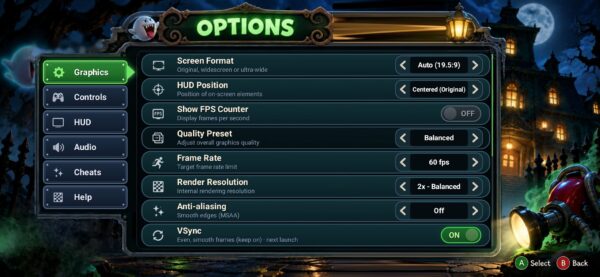
The previous automatic cooldown feature has also been removed, so the app no longer lowers your FPS setting when the device gets warm.
Premium Deluxe
Premium Deluxe support was already present in the previous release. The current notes describe installing the 2.2.1 fan made patch through Game Files → Install DLC (Premium Deluxe), using either its .xdelta file or the GameBanana ZIP.
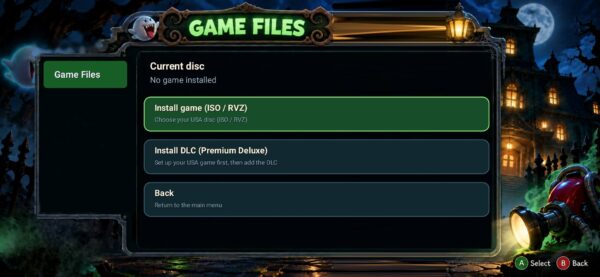
The app builds the modified game from your own disc image and keeps its saves separate. Building Premium Deluxe from an uncompressed RVZ is now supported alongside ISO.
Read this before updating
We compared the APK from the previous LuigiV2.0 release with the current V3.0 download. Both use the same Android package name, but their signing certificates is different. Android therefore rejects the new APK as a normal replacement for the old one.
For these published builds, upgrading requires uninstalling the old app first. That removes its app-specific data, so do not start there.
Before uninstalling:
- Open the old version, finish a play session and return to its launcher so its save backup routine can run.
- Check that
Download/Luigi's Mansion Android/LM-saves.zipexists and is up to date. Copy it somewhere safe. - Make sure you still have your original game image and any Premium Deluxe patch needed for reinstallation.
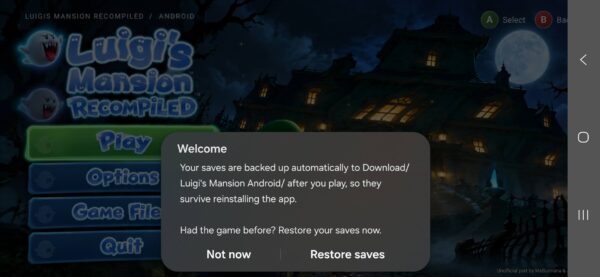
After installing the new APK, import your game again and use Options → Help → Restore Saves (if you missed the pop-up prompt) to select the backup ZIP. Expect to configure your settings again. The save archive is not a complete backup of the installation.
The port needs 64-bit ARM devices running Android 13 or newer. Its disc installer accepts the USA GameCube release, GLME01, revision 0. No game files are included.
Links
Download the latest Luigi’s Mansion Android release
Android port repository
Original PC recompilation
D.B.