
Command & Conquer: Generals Zero Hour on Android
Command & Conquer: Generals Zero Hour has an unofficial native Android port, with campaign, skirmish, Generals Challenge and online multiplayer listed. MYSOREZ’s GeneralsZH Android project includes touchscreen controls and support for matches against PC players. It’s still in active development, and the latest published release, version 1.4.0, arrived on October 3.
The project runs the original engine compiled for ARM64, using EA’s released Generals and Zero Hour source code and work from several community projects. These include TheSuperHackers, Fighter19’s Unix port, GeneralsX and the Mac and iOS port that this Android project was forked from.It does not need Winlator or an emulated Windows environment. Graphics are handled through either a native DirectX 8 to OpenGL ES translation layer or DXVK with Vulkan.
What you need
An ARM64 Android device and your own game files. The APK does not include the original game’s assets.
Copy your game installation to a folder on the device, open the launcher and choose Select Game Folder. Grant the requested storage access, select the folder and launch the game. The setup guide puts the game data at roughly 2.7GB, so the approximately 63MB APK is only the beginning.
Stating the obvious: Zero Hour is an expansion, so it also needs assets from the base Generals game. Missing archives such as Terrain.big, Textures.big and W3D.big can leave textures missing or show weird colours.
OpenGL ES as default
The latest version (1.4.0) gives the OpenGL ES renderer its own rendering thread and reduces overhead. The dev mentioned s heavy battles improving from around 23fps to 35fps on an older Mali test phone, before enabling upscaling. That is a project benchmark, not an AndroGaming.com test or a performance promise for other devices.
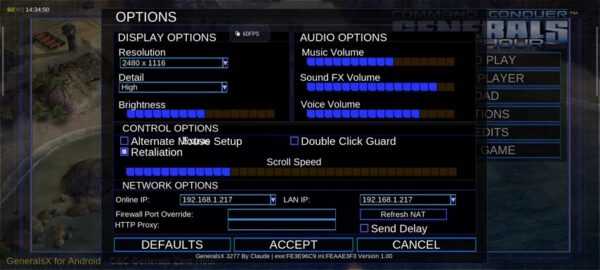
The update also adds Snapdragon Game Super Resolution to the OpenGL ES backends. It renders the battlefield at a lower resolution and scales it back up, while keeping menus, text and the command bar at full resolution.
Touch controls & Online
Tap to select units or issue contextual orders, double tap to select units of the same type, and hold then drag to draw a selection box. Two finger gestures handle camera movement and zoom. Pretty neat.
Abilities can be aimed by dragging their targeting area and releasing to activate them. A second finger cancels, while holding a command button displays its description without purchasing or building anything.
Multiplayer uses GeneralsOnline, with support for lobbies, custom matches, matchmaking and social features. The project also lists LAN matches between phones on the same Wi-Fi network as working.
For online play, sign in through the launcher and install its Online game data package. To play against Windows users, enable Play with PC players. The PC player must disable GeneralsOnline’s anti-cheat for compatibility with the mobile client, or you won’t be able to see each other.
One important note, make sure you use a separate account on each device. Signing into the same account on another phone or PC ends the previous session.
Some troubles
An open v1.4.0 report describes OpenGL ES crashes on a TECNO Pova 5 with Mali-G57 MC2, while Vulkan reportedly works at lower performance. Other users have reported multiplayer connection problems and missing text with mods. These are user reports, but they are enough reason to avoid calling compatibility universal.
Start with the default renderer and a clean game installation. If graphics are corrupted or the game crashes, try another backend and use the launcher’s built-in log viewer to troubleshoot.
Links
- GeneralsZH Android Port on GitHub
- Version 1.4.0 download and release notes
- Android installation and troubleshooting guide
- GeneralsOnline
- Bug reports and compatibility issues